Winter Village
From Modular Assets to a Complete Environment
A stylized environment exploring how reusable architectural pieces can create a village with variety, atmosphere, and a consistent visual identity.
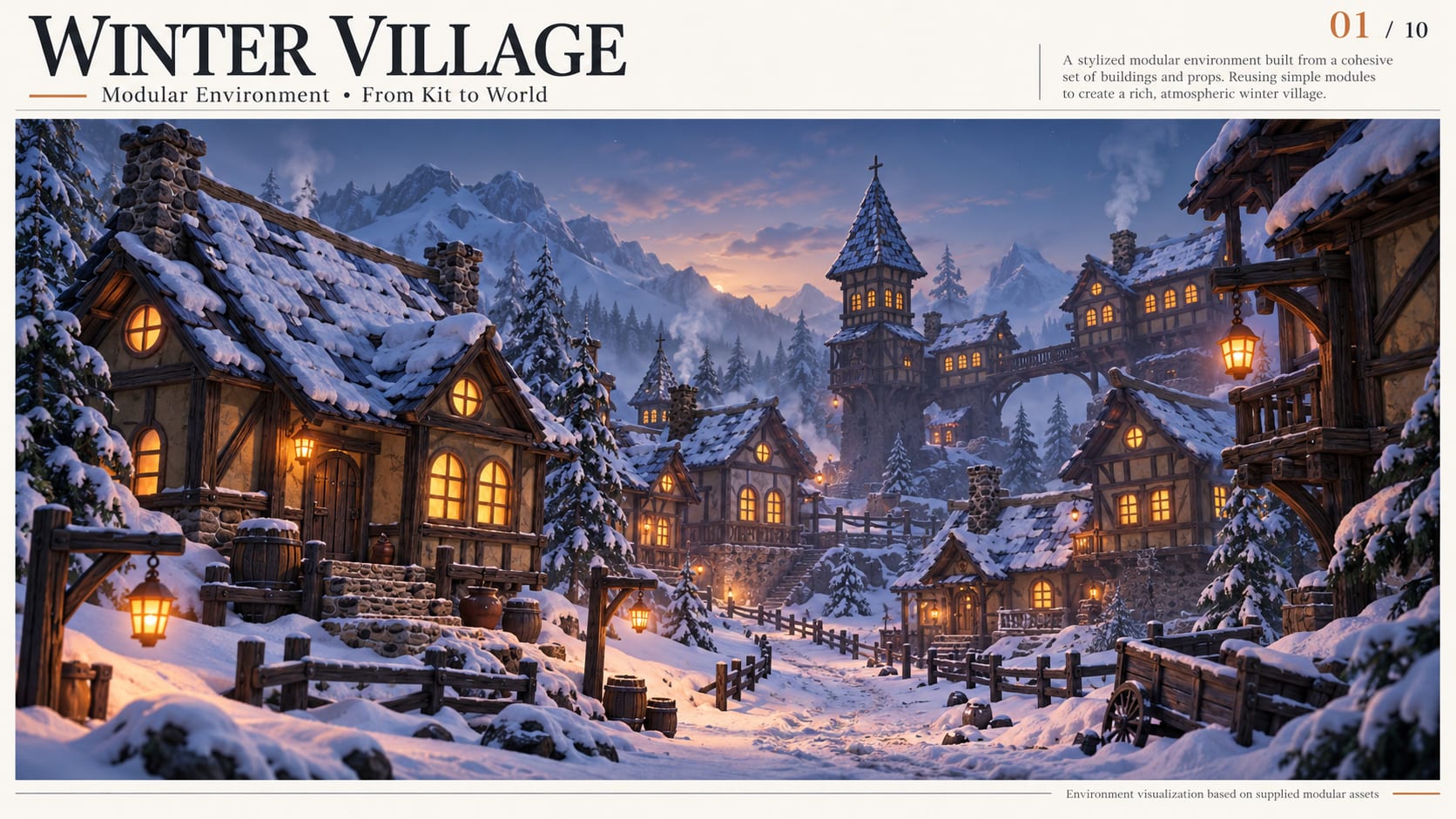
The project brings together timber-framed buildings, stone foundations, blue shingle roofs, and warm illuminated windows within a snowy mountain setting. Its central idea is modular construction: designing compatible parts that can be combined into different buildings and reused throughout the environment.
The challenge
Building a village involves more than placing houses on terrain. Buildings need to belong to the same world while remaining visually distinct. Streets must feel connected, entrances must meet the ground, and props should suggest how people use the space.
The main challenge was to balance repetition with variety. Too many identical buildings make an environment feel artificial. Creating every building separately increases production work and makes revisions harder.
The solution was to treat the architecture as a system: shared structural pieces, interchangeable details, and a consistent material palette.
01 — Start with the environment concept
The workflow begins with rough sketches exploring the village layout, building silhouettes, and focal points. At this stage, simple drawings help compare ideas quickly without committing to detailed modeling.
A winding street, a compact courtyard, and a hillside cluster each create a different experience. A tall tower provides a recognizable landmark, while lower buildings establish a rhythm around it.
The key decision is how the viewer moves through the scene. The main route and focal point should work before surface detail is introduced.
02 — Break the architecture into reusable parts
Once the visual direction is clear, the buildings can be divided into a modular kit.
The kit includes stone bases, timber-framed wall sections, upper-floor volumes, roof forms, doors, windows, balconies, and supporting beams. Smaller props—such as fences, barrels, benches, carts, and lanterns—support the environment around them.
The important question is: which elements can be shared without making every building look the same?
Repeated structural components create consistency. Different rooflines, building heights, window arrangements, and balcony placements provide variation.
03 — Establish scale and connection rules
Modular pieces need predictable dimensions and connection points. Before detailed modeling, the kit should follow a consistent scale, grid system, and pivot-placement convention.
This prevents common assembly problems: walls that leave gaps, roofs that fail to align, and balconies that require manual adjustment on every building.
Test connections early using simple geometry. A module that looks good alone must also work beside, above, and below the other pieces.
04 — Build and test the blockout
The blockout uses basic shapes to establish building proportions and village composition.
Simple volumes represent foundations, floors, roofs, and towers. These are assembled into a few building variations and placed along the planned route.
This stage reveals problems while they are still easy to fix. A tower may dominate the scene, two houses may block the main view, or the street may feel too narrow.
Review the environment from both elevated and ground-level cameras. An arrangement that works from above may feel disconnected when viewed from the street.
05 — Refine forms before adding detail
After the blockout works, the architecture gains its defining shapes: overhanging floors, roof edges, window arches, balcony supports, and timber framing.
Surface detail follows the larger forms. Wood grain, chipped shingles, and uneven stones should reinforce the stylized appearance while keeping the main silhouette readable.
Connection edges need special attention. Organic irregularity gives the buildings character, but excessive distortion can make modular pieces difficult to assemble.
06 — Prepare UVs and develop shared materials
The UV stage supports consistent texture scale across the kit. Timber beams, wall panels, and stone sections should have comparable surface detail when placed together.
Seams can follow natural breaks or less visible edges. Repeated surfaces can share tiling materials, while distinctive elements receive additional texture attention where needed.
The material palette connects the entire village: dark timber, muted plaster, rough stone, blue shingles, and amber window light.
Snow adds another layer of consistency. Its coverage should respond to exposed surfaces and roof shapes, allowing the same architectural kit to fit the winter setting.
07 — Assemble building variations
The finished modules can now be combined into cottages, taller houses, towers, and connected structures.
Variation comes from changing the combination of parts. A shared foundation and upper floor can support different roofs; a balcony or small extension can change the building’s profile.
Each variation should remain structurally believable. Supports need to connect, roofs should cover the intended footprint, and entrances should remain accessible.
This is where the value of the modular system becomes visible: a limited kit supports several recognizable building types.
08 — Shape the terrain and dress the scene
Buildings are placed to establish the village’s main route, gathering areas, and landmark views. Terrain is then adjusted around foundations and entrances so the architecture feels grounded.
Props are arranged according to likely activity. Barrels and carts belong near storage or delivery areas. Benches suggest places to rest. Fences define boundaries, while lantern posts help mark the route.
Repetition is reduced through deliberate placement, rotation, spacing, and material variation. Avoid stretching architectural pieces so much that their proportions or texture scale become inconsistent.
09 — Use lighting to support the composition
Lighting brings the environment together.
Cool ambient light establishes the winter atmosphere. Warm windows and lanterns create inviting focal points and help lead the eye through the village.
Fog separates distant buildings from the foreground, while restrained chimney smoke suggests activity. These effects should support the architecture and preserve clear silhouettes.
The scene should also be reviewed without strong atmospheric effects. Good lighting can strengthen a clear composition, but the underlying layout still needs to work.
10 — Prepare for game use
The final production stage checks whether the assets function reliably in the intended engine.
This includes naming, export scale, pivots, snapping, material assignments, collision, and an appropriate level-of-detail strategy. Repeated meshes and shared materials offer opportunities for reuse, but performance must be measured in the actual scene.
Collision should support movement without reproducing every small surface detail. Doors, steps, narrow passages, and building connections need practical testing.
A finished render demonstrates visual quality. A game-ready environment also requires technical validation.
The result
The supplied renders demonstrate the central strength of the project: recognizable architectural pieces can combine into different buildings and form a cohesive snowy village.
The broader lesson is to solve the environment at several scales. Establish the layout first, make the modules connect reliably, develop a shared material language, and use props and lighting to give the assembled world a sense of place.